
FAQ
Common integration issues
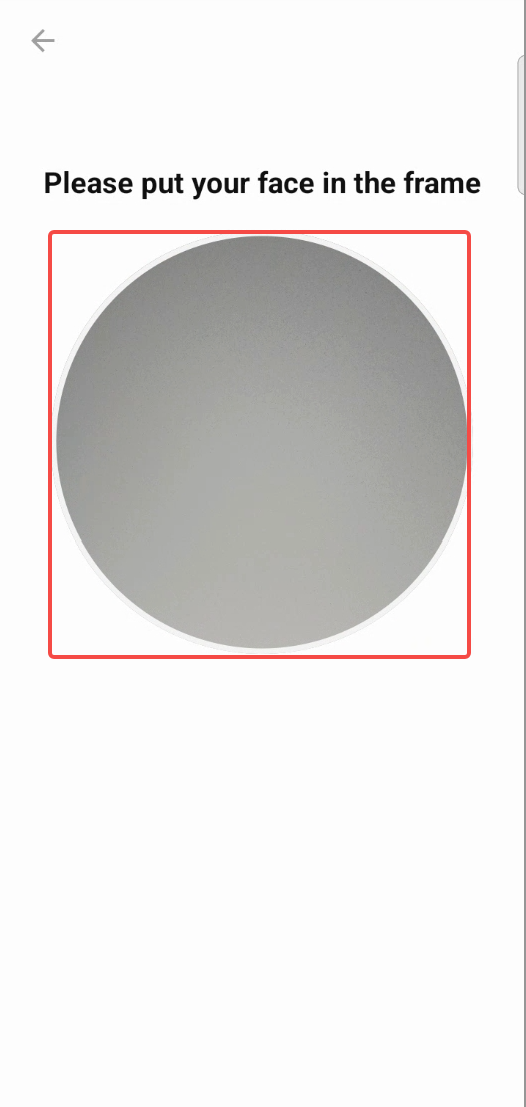
What is the scope of UI customization?The controls in the red area (LivenessView) must be square, with the width and position adjustable.
Please do not overlay a mask layer on the controls in the red area (LivenessView).
Aside from that, all other page elements can be customized.
My app only needs to support one language, and the default language is not English. What should I do?
- Add the following configuration in the
build.gradlefile of your app module to ensure that other languages are ignored when packaging the APK.android { defaultConfig { ... resConfigs("in-rID") // For example, only Indonesian is supported } }
- Since the default language of the SDK is English, meaning the values directory contains English resources, you need to copy the language resources from the
values-in-rIDfolder to the values directory to replace the English resources.
How to customize the UI text (For Android)?Please follow these steps:
- Download the UI SDK for the corresponding version: liveness-detection-ui-4.1.7.aar.
- Change the file extension from
.aarto.zip, then extract the file.- Navigate to the
resdirectory, where you will find folders for different languages (e.g.,values,values-in-rID).- Copy these folders into your project's corresponding
resdirectory.- Modify the text values as needed within the
strings.xmlfiles.
- Note: You can only modify the text content; do not change any resource keys, otherwise the SDK will not be able to locate the strings.
How to customize fonts(For Android)?Please follow these steps:
- Download and extract the UI SDK as mentioned in the previous question.
- Navigate to the
res/layoutdirectory.- Copy the
activity_liveness.xmlfile into your project'slayoutfolder.- You can then modify the
TextViewelements in this file to apply your desiredfontFamily.
- Crucial Warning: Do not modify any View IDs or delete any Views from the layout. Doing so will likely cause the application to crash, as the SDK logic relies on these IDs to function.
What value should be passed as the userId in the bindUser method?A string that can identify the current liveness event. Recommended values: user ID, username, device ID, transaction number.
Why does the action liveness have voice prompts, but the distant-near liveness does not?Yes, the distant-near liveness does not have voice prompts
What to do if the SDK reports that the just obtained license has expired?To reduce the number of network requests, the license validity check is performed locally on the phone based on the current phone time and the license expiration time. This issue is usually caused by the user's phone time being inaccurate.
Suggestions:
- Check the accuracy of the user's phone time, and prompt the user not to modify the phone time if they have.
- Set a longer license validity period when requesting the license.
How much memory will the SDK consume at runtime?It depends on the camera performance, there is no specific value. It is recommended to use relevant tools for detection.
Will AAI store the recorded video?AAI is not responsible for storing video files, it only supports obtaining the liveness video through the SDK. Please transmit the video properly and delete the video file on the phone according to your business needs.
Scanning found that the SDK called methods like androidId that access device information, how to remove it?Use the corresponding nd version of the core dependency:(Here, we take version 5.8 of the core as an example. In fact, each version of the core has a corresponding ND version, and you should choose the core that matches the current Liveness SDK version.)
implementation 'ai.advance.mobile-sdk.android:core:5.8.nd'
How is liveness charged? When are the billing points?The billing point for liveness occurs when the livenessId is generated. Calling the score retrieval interface does not affect billing.
We found a discrepancy between the number of received livenessIds and the bill provided by AAI. What could be the reason?
livenessIdis generated after the SDK successfully uploads image information to the backend. Therefore, if the user clicks the back button to leave the page before the upload is complete, the SDK will return the error code UPLOAD_PICTURE_GIVE_UP. Meanwhile, the network request may still be ongoing, leading to a discrepancy in the livenessId reconciliation. Another possible scenario is that we successfully return the livenessId to your app, but due to unknown reasons, the app fails to report the livenessId to your backend, which can also cause reconciliation issues.
What solutions are available to resolve billing discrepancies?Yes, the SDK configs provide a method: setSignatureId. You can set the signatureId before each detection starts. This ID is functionally equivalent to livenessId and can be used to query liveness results. Any signatureId with results will be chargeable.
For information on the generation of SignatureId, please refer to the relevant backend API documentation.
What is the purpose of livenessType, and what values should we pass?
livenessTyperefers to your liveness scenarios, allowing you to configure different liveness modes for various situations. You need to contact us to add the desired livenessType. If an unconfigured livenessType is used, it will return a MODEL_ERROR, and the message will indicate the reason for the error.
Do I need to save the eventId? What is the purpose of eventId?Yes, the eventId is very important. It is a key field used for reporting issues to us. Without this ID, it will be difficult to troubleshoot problems, so please make sure to save it.
Reduce package size
We have requirements for the SDK's package size. Is it possible to reduce the package size of the liveness detection SDK?Yes, the SDK package size mainly resides in the .so files and model files. We support removing the dependency on the model file module, which can reduce the size by 1.4MB. When performing liveness detection for the first time, the SDK will pull the model files from a remote source.
implementation ('ai.advance.mobile-sdk.android:liveness-detection:x.x.x'){
		exclude group: 'ai.advance.mobile-sdk.android', module: 'liveness-detection-model'
}
Updated 6 months ago