
Frontend Configuration
Note: These configurations are currently managed by Advance Intelligence (AAI).
This document describes the structure and usage of the system configuration file. The configuration uses a modular JSON format, allowing flexible extension and merging.The configuration includes the following three main modules:
- Theme Configuration: Controls the visual style of the system
- Language Configuration: Used for multilingual content
- Feature Configuration: Used to toggle system feature modules
1. Theme Configuration
Description
The theme supports two modes: light (light mode) and dark (dark mode), and both can coexist.They share the same configuration structure, and support the following fields:
{
  "colors": {
    "primary": "#F8A800",
    "text": {
      "primary": "#333333"
    },
    "background": {
      "primary": "#FFFFFF",
      "secondary": "#F8F8F8"
    }
  },
  "typography": {
    "fontFamily": {
      "primary": "sharp-sans"
    },
    "textAlign": {
      "primary": "center"
    },
    "fontWeights": {
      "medium": 500,
      "bold": 700
    },
    "fontSize": {
      "xs": "12px",
      "sm": "14px",
      "md": "16px",
      "lg": "18px",
      "xl": "24px"
    }
  },
  "spacing": {
    "padding": {
      "default": "16px 16px 25px"
    }
  },
  "components": {
    "buttons": {
      "color": "#000000",
      "background": "#F8A800"
    }
  },
  "assets": {
    "icons": {
      "camera": "https://xxx/camera.svg",
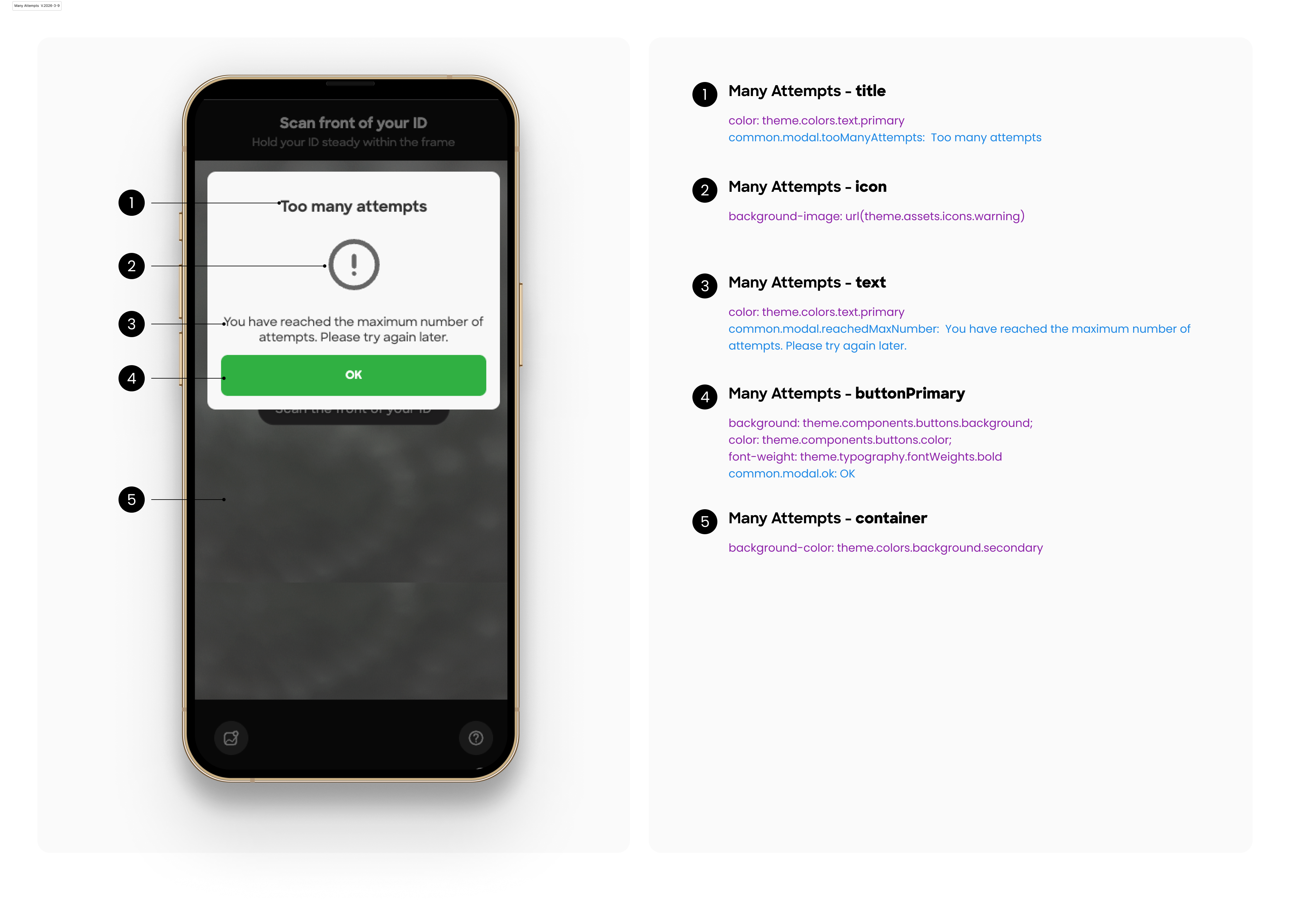
      "warning": "https://xxx/warning.svg",
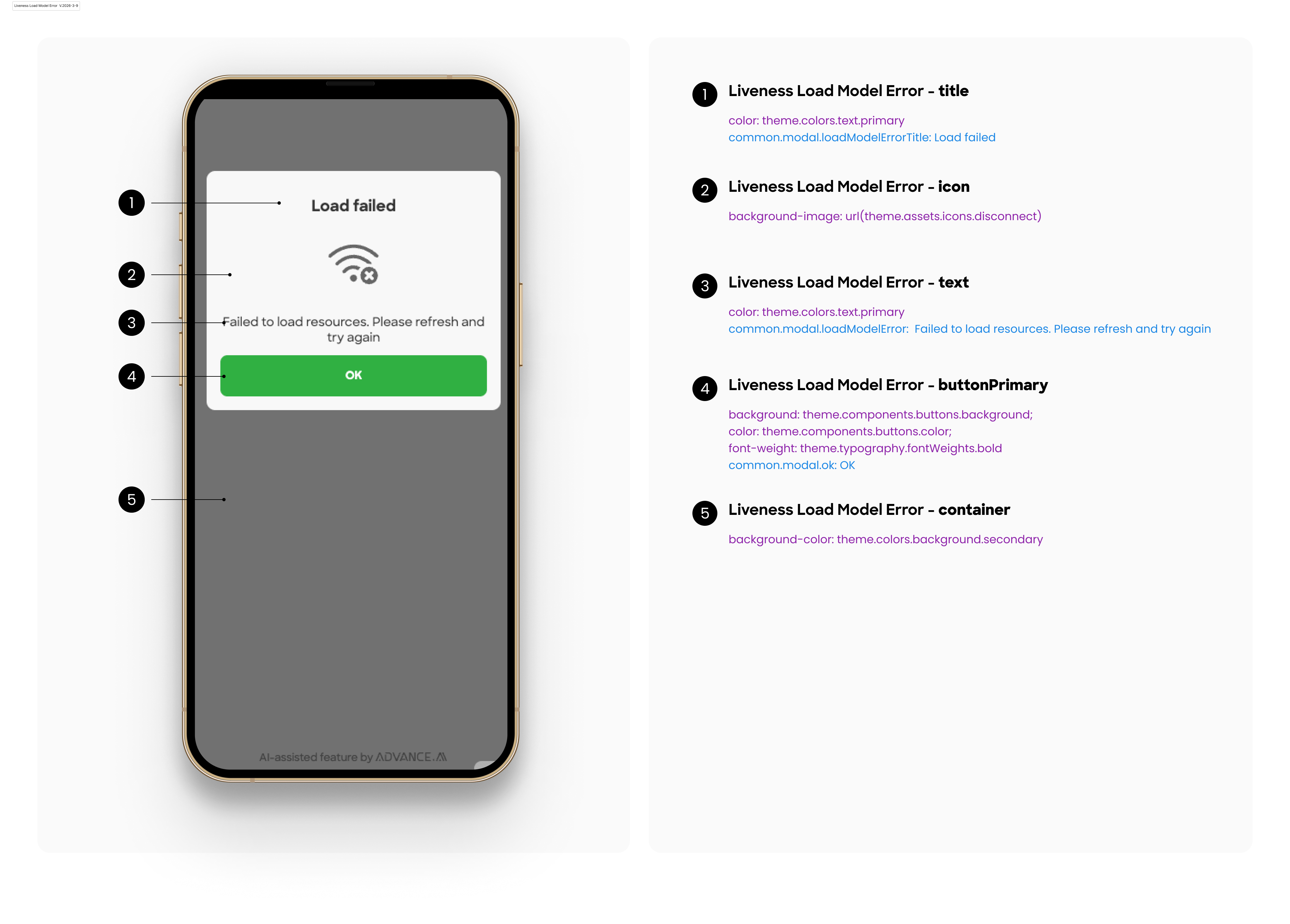
      "disconnect": "https://xxx/disconnect.svg",
      "documentTimeout": "https://xxx/document-timeout.svg",
      "documentGuide": "https://xxx/guide.svg",
      "fallbackTip": "https://xxx/fallback-tip.svg",
      "cameraPermission": "https://xxx/camera-permission.svg"
    }
  }
}
Users are free to choose which fields to configure in each mode — there is no requirement to provide all fields.
Any field left unconfigured will fall back to a default value
Default Configuration
The following lists all supported configuration fields. If the user does not provide any configuration, the system will use the following default settings by default.
{
  "light": {
    "colors": {
      "primary": "#30B043",
      "text": {
        "primary": "#333333"
      },
      "background": {
        "primary": "#FFFFFF",
        "secondary": "#F8F8F8"
      }
    },
    "typography": {
      "fontFamily": {
        "primary": "sharp-sans"
      },
      "textAlign": {
        "primary": "center"
      },
      "fontWeights": {
        "medium": 500,
        "bold": 700
      },
      "fontSize": {
        "xs": "12px",
        "sm": "13px",
        "md": "16px",
        "lg": "18px",
        "xl": "20px"
      }
    },
    "spacing": {
      "padding": {
        "default": "16px 16px 25px"
      }
    },
    "components": {
      "buttons": {
        "color": "#fff",
        "background": "#30B043"
      }
    },
    "assets": {
      "icons": {
        "camera": "<default light camera icon url>",
        "warning": "<default light warning icon url>",
        "disconnect": "<default light disconnect base64 data url>",
        "documentTimeout": "<default light document-timeout icon url>",
        "documentGuide": "<default light guide icon url>",
        "fallbackTip": "<default light fallback-tip icon url>",
        "cameraPermission": "<default camera-permission icon url>"
      }
    }
  },
  "dark": {
    "colors": {
      "primary": "#30B043",
      "text": {
        "primary": "#fff"
      },
      "background": {
        "primary": "#000",
        "secondary": "#333"
      }
    },
    "typography": {
      "fontFamily": {
        "primary": "sharp-sans"
      },
      "textAlign": {
        "primary": "center"
      },
      "fontWeights": {
        "medium": 500,
        "bold": 700
      },
      "fontSize": {
        "xs": "12px",
        "sm": "14px",
        "md": "16px",
        "lg": "18px",
        "xl": "24px"
      }
    },
    "spacing": {
      "padding": {
        "default": "16px 16px 25px"
      }
    },
    "components": {
      "buttons": {
        "color": "#fff",
        "background": "#30B043"
      }
    },
    "assets": {
      "icons": {
        "camera": "<default dark camera icon url>",
        "warning": "<default dark warning icon url>",
        "disconnect": "<default dark disconnect base64 data url>",
        "documentTimeout": "<default dark document-timeout icon url>",
        "documentGuide": "<default dark guide icon url>",
        "fallbackTip": "<default dark fallback-tip icon url>",
        "cameraPermission": "<default camera-permission icon url>"
      }
    }
  }
}
Configuration Example
For example, if you want to modify the text color and button background color in the light theme, you can use the following JSON configuration.
{
    "light": {
        "colors": {
            "primary": "#00B894"
        },
        "components": {
            "buttons": {
                "background": "#00B894"
            }
        }
    }
}
2. Language Configuration
Description
Fields can be defined as needed and will be automatically merged. There is no need to redefine default values.
Default Language Configuration
{
  "common": {
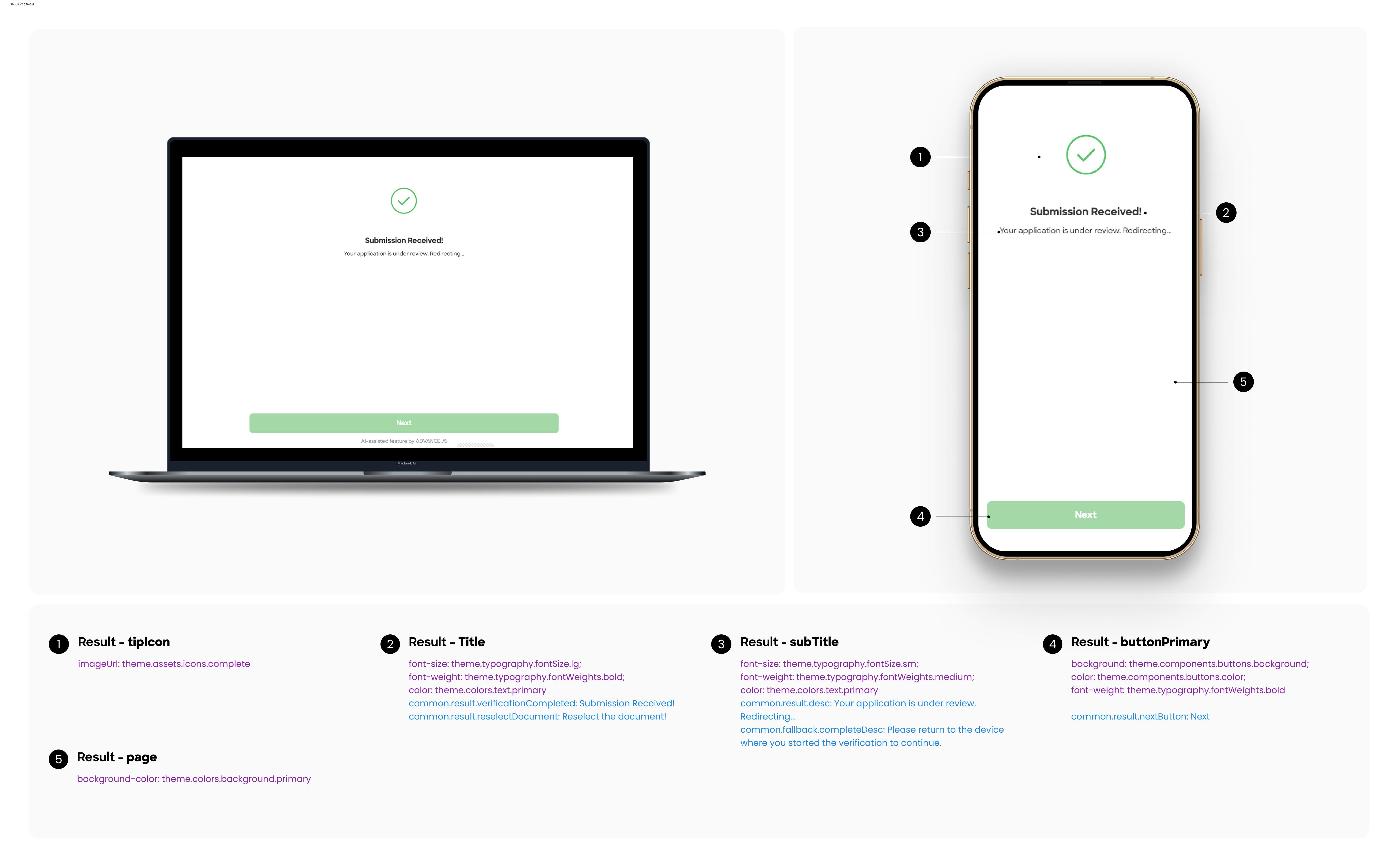
    "result": {
      "verificationCompleted": "Submission Received!",
      "reselectDocument": "Reselect the document!",
      "desc": "Your application is under review. Redirecting...",
      "countdown": "Redirecting in {seconds} seconds",
      "nextButton": "Next"
    },
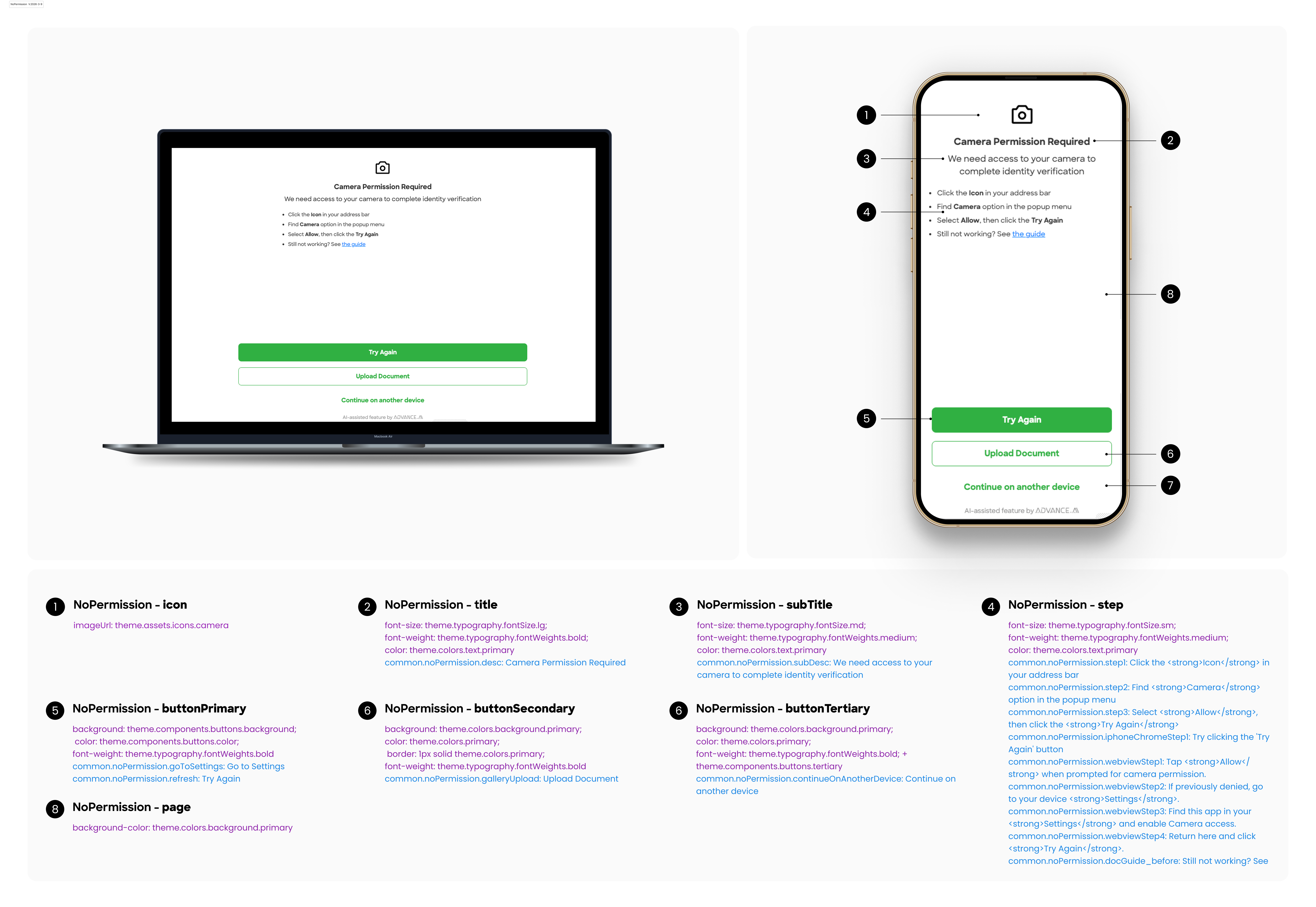
    "noPermission": {
      "desc": "Camera Permission Required",
      "goToSettings": "Go to Settings",
      "subDesc": "We need access to your camera to complete identity verification",
      "step1": "Click the <strong>Icon</strong> in your address bar",
      "step2": "Find <strong>Camera</strong> option in the popup menu",
      "step3": "Select <strong>Allow</strong>, then click the <strong>Try Again</strong>",
      "docGuide_before": "Still not working? See ",
      "docGuide_link": "the guide",
      "iphoneChromeStep1": "Try clicking the 'Try Again' button",
      "webviewStep1": "Tap <strong>Allow</strong> when prompted for camera permission.",
      "webviewStep2": "If previously denied, go to your device <strong>Settings</strong>.",
      "webviewStep3": "Find this app in your <strong>Settings</strong> and enable Camera access.",
      "webviewStep4": "Return here and click  <strong>Try Again</strong>.",
      "refresh": "Try Again",
      "continueOnAnotherDevice": "Continue on another device",
      "stillNoPermission": "Please granted the camera permissions",
      "galleryUpload": "Upload Document"
    },
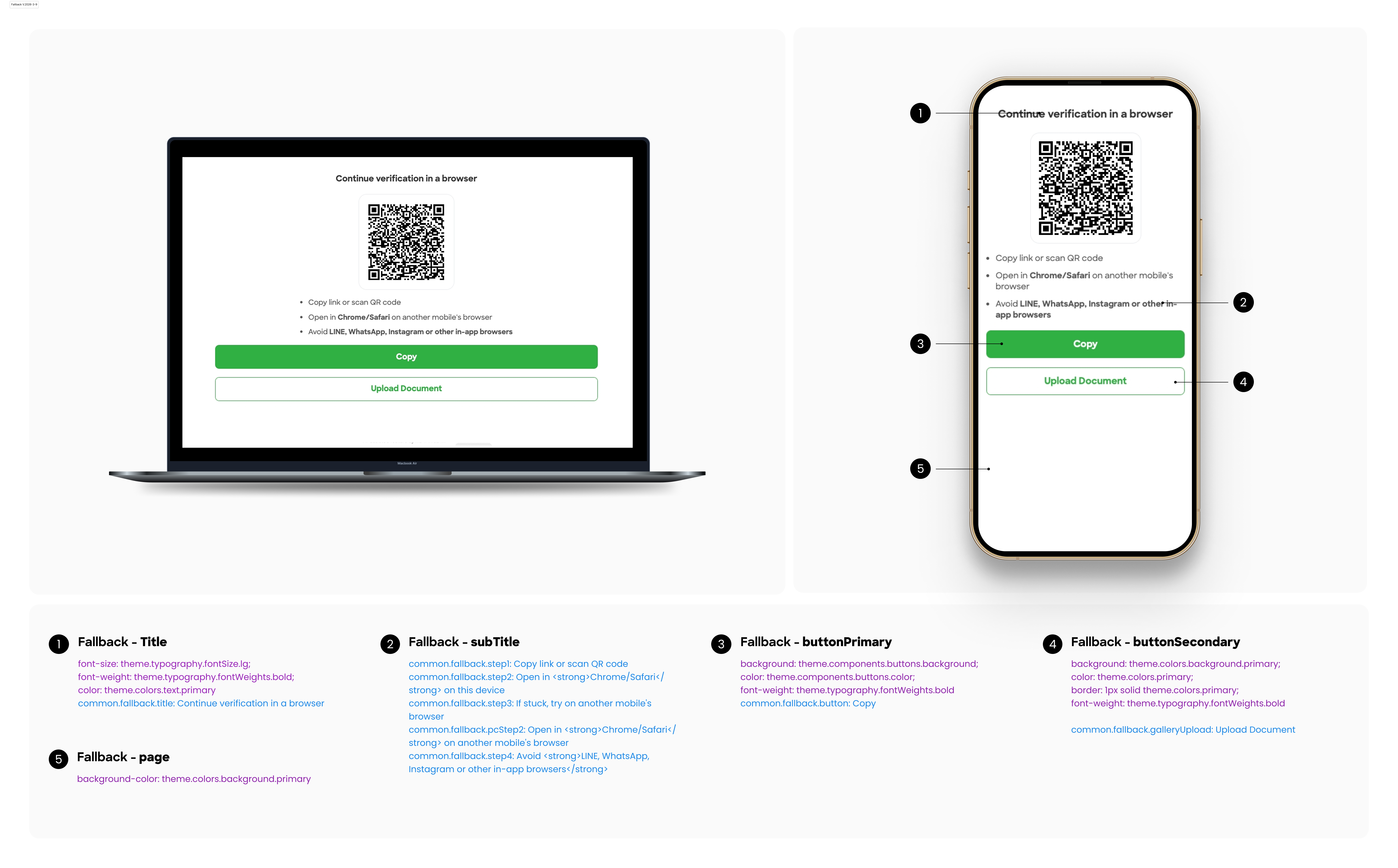
    "fallback": {
      "title": "Continue verification in a browser",
      "stepLockdownMode": "Lockdown Mode maybe <strong>enabled</strong>, Please <strong>disable</strong> it in [Settings] → [Privacy & Security] → [Lockdown Mode]",
      "step1": "Copy link or scan QR code",
      "step2": "Open in <strong>Chrome/Safari</strong> on this device",
      "step3": "If stuck, try on another mobile's browser",
      "step4": "Avoid <strong>LINE, WhatsApp, Instagram or other in-app browsers</strong>",
      "pcStep2": "Open in <strong>Chrome/Safari</strong> on another mobile's browser",
      "button": "Copy",
      "galleryUpload": "Upload Document",
      "processingTitle": "Processing...",
      "processingDesc": "Please wait a second",
      "complteTitle": "Submission Received!",
      "completeDesc": "Please return to the device where you started the verification to continue.",
      "copyTip": "Copied to clipboard",
      "copyFail": "Copy Failure",
      "ocrIssue": "KTP recognition failed"
    },
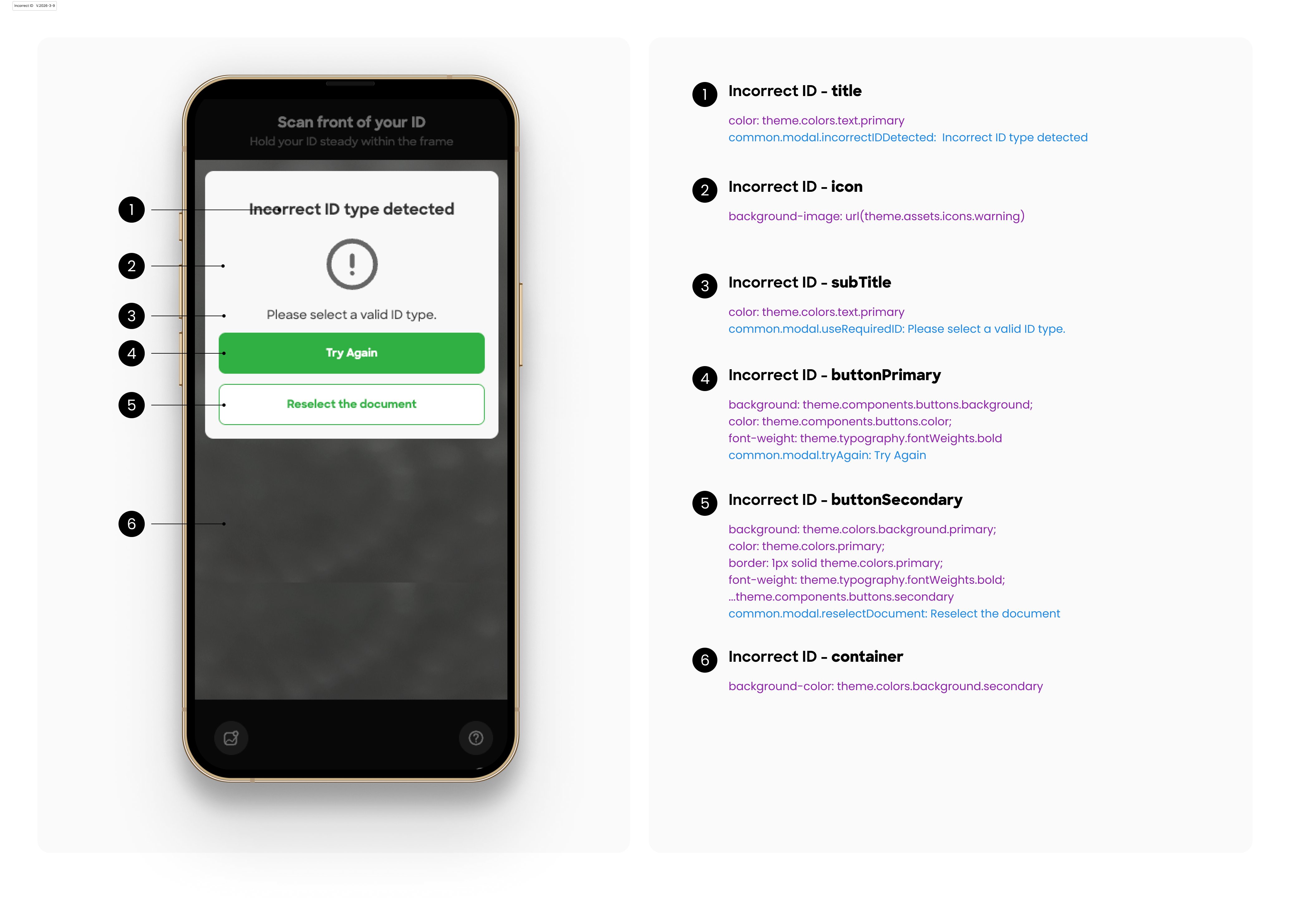
    "modal": {
      "success": "Success!",
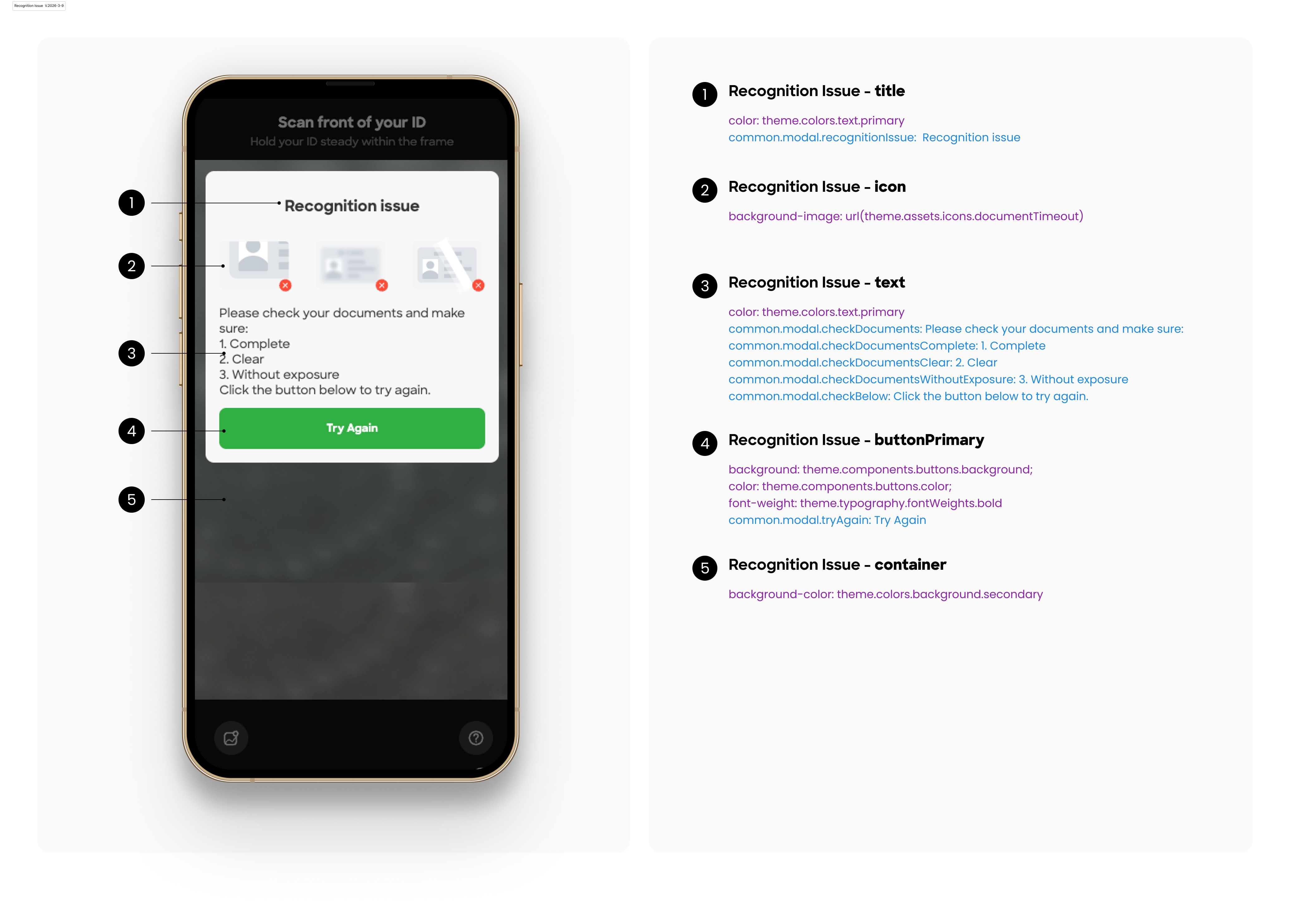
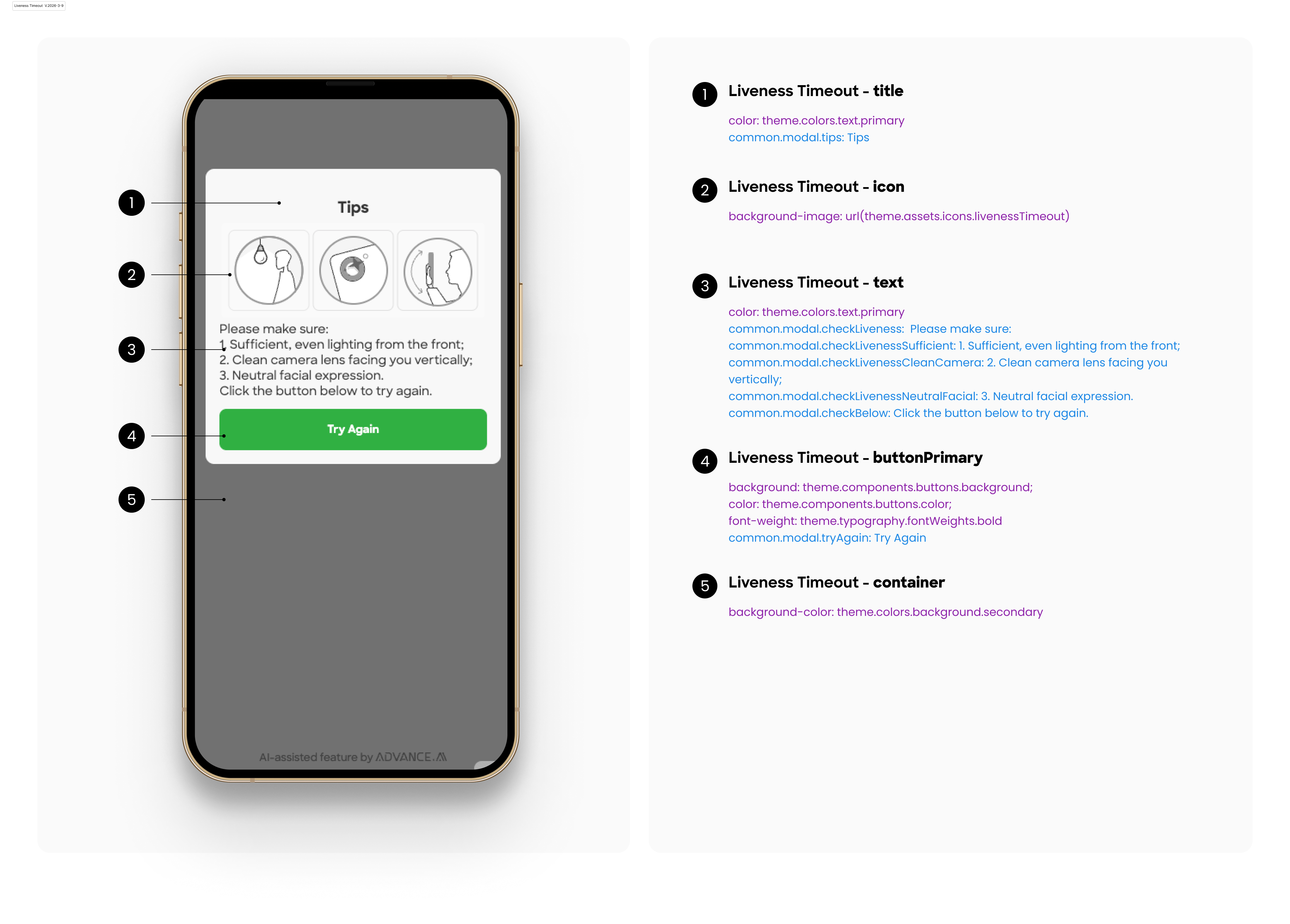
      "tips": "Tips",
      "tryAgain": "Try Again",
      "recognitionIssue": "Recognition issue",
      "checkDocuments": "Please check your documents and make sure:",
      "checkLiveness": "Please make sure:",
      "checkLivenessSufficient": "1. Sufficient, even lighting from the front;",
      "checkLivenessCleanCamera": "2. Clean camera lens facing you vertically;",
      "checkLivenessNeutralFacial": "3. Neutral facial expression.",
      "checkDocumentsComplete": "1. Complete",
      "checkDocumentsClear": "2. Clear",
      "checkDocumentsWithoutExposure": "3. Without exposure",
      "checkBelow": "Click the button below to try again.",
      "takePhoto": "Take Photo",
      "reselectDocument": "Reselect the document",
      "incorrectIDDetected": "Incorrect ID type detected",
      "incorrectRegion": "Incorrect region detected",
      "selectRegion": "Please select a valid region.",
      "reselectRegion": "Reselect the region",
      "useBackSide": "Please use the back side",
      "useRequiredID": "Please select a valid ID type.",
      "tooManyAttempts": "Too many attempts",
      "reachedMaxNumber": "You have reached the maximum number of attempts. Please try again later.",
      "loadModelErrorTitle": "Load failed",
      "loadModelError": "Failed to load resources. Please refresh and try again",
      "ok": "OK",
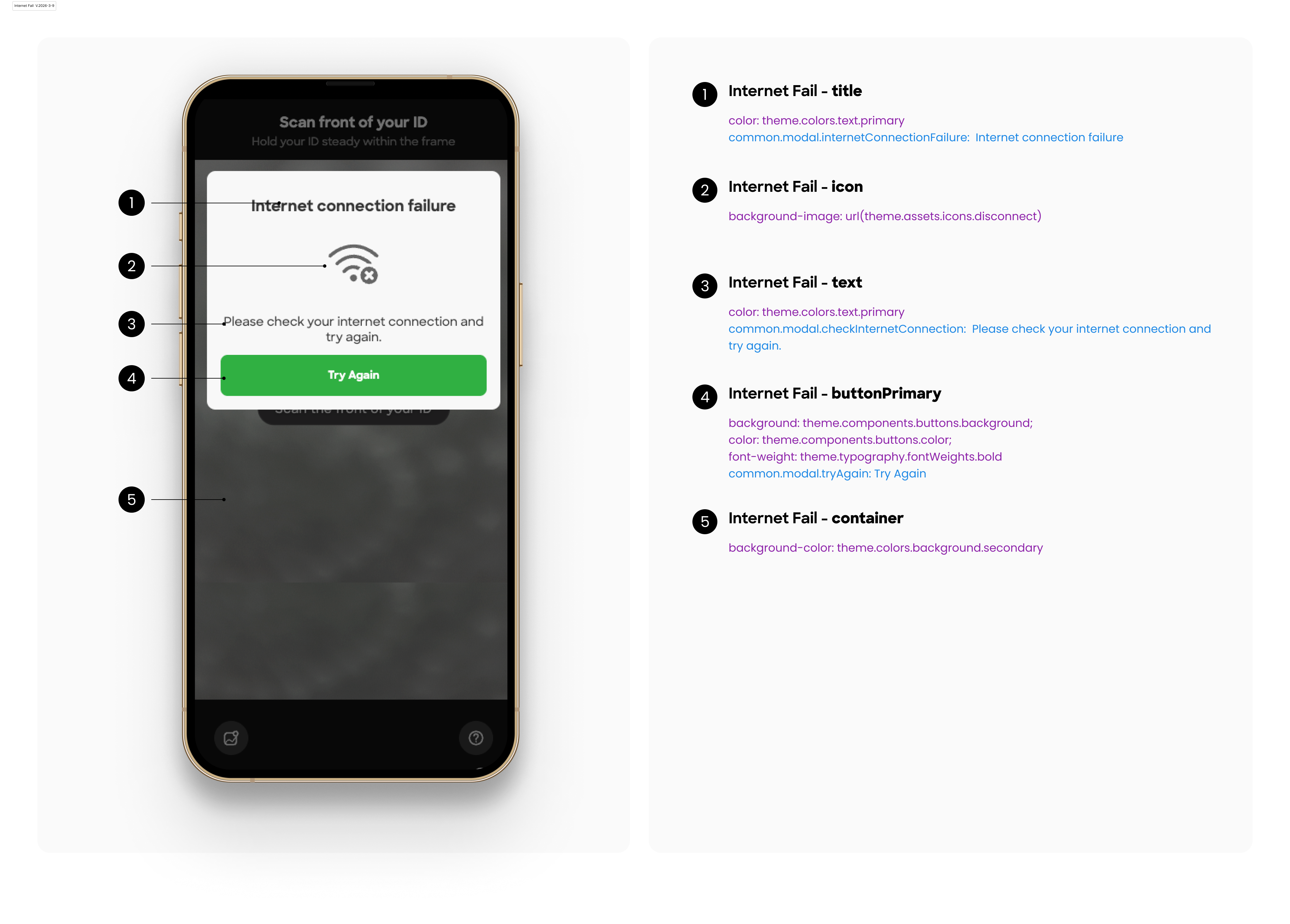
      "internetConnectionFailure": "Internet connection failure",
      "checkInternetConnection": "Please check your internet connection and try again.",
      "noCameraPermission": "No camera permission",
      "allowAppCamera": "Please allow the application to access your camera, or refresh and try again.",
      "refresh": "Refresh",
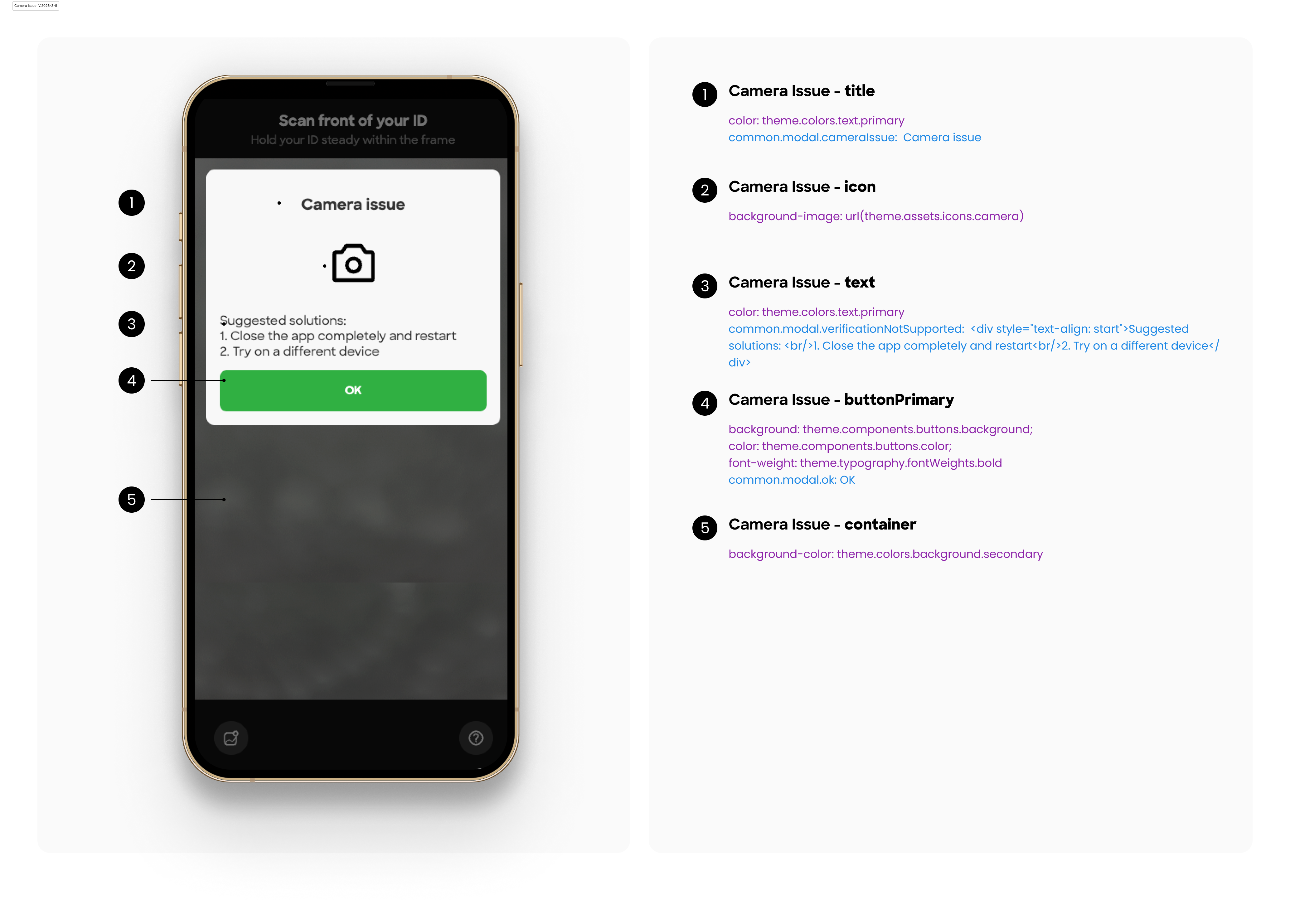
      "cameraIssue": "Camera issue",
      "verificationNotSupported": "<div style=\"text-align: start\">Suggested solutions: <br/>1. Close the app completely and restart<br/>2. Try on a different device</div>",
      "prepareTitle": "Please prepare the documents for verification!",
      "prepareBtnText": "I'm Ready",
      "blurDetected": "Blur detected - try to adjusting camera focus....",
      "docExpired": "Expired ID",
      "docExpiredSubtitle": "Make sure you are using the qualified ID",
      "illegalIssueDate": "Illegal ID",
      "illegalIssueDateSubtitle": "Make sure you are using the qualified ID",
      "cardInfoMismatch": "ID mismatch detected",
      "cardInfoMismatchSubtitle": "Front and back do not match. Please resubmit your ID.",
      "currentNodeWrong": "Something went wrong",
      "currentNodeWrongSubtitle": "Please refresh and try again",
      "currentNodeWrongButton": "Refresh",
      "noFaceDetected": "Face not detected on ID",
      "noFaceDetectedSubtitle": "Make sure the face photo on your ID is clear and visible",
      "ocrNoResultReupload": "Verification Failed",
      "ocrNoResultReuploadSubtitle": "Please retake the front side of your ID",
      "regionTypeMismatch": "Region Mismatch",
      "regionTypeMismatchSubtitle": "The document region does not match the selected region. Please use a document from the correct region.",
      "shortValidity": "Insufficient document validity",
      "shortValiditySubtitle": "The document's remaining validity is less than {days} days. Please upload a document with a valid period of at least {days} days and resubmit.",
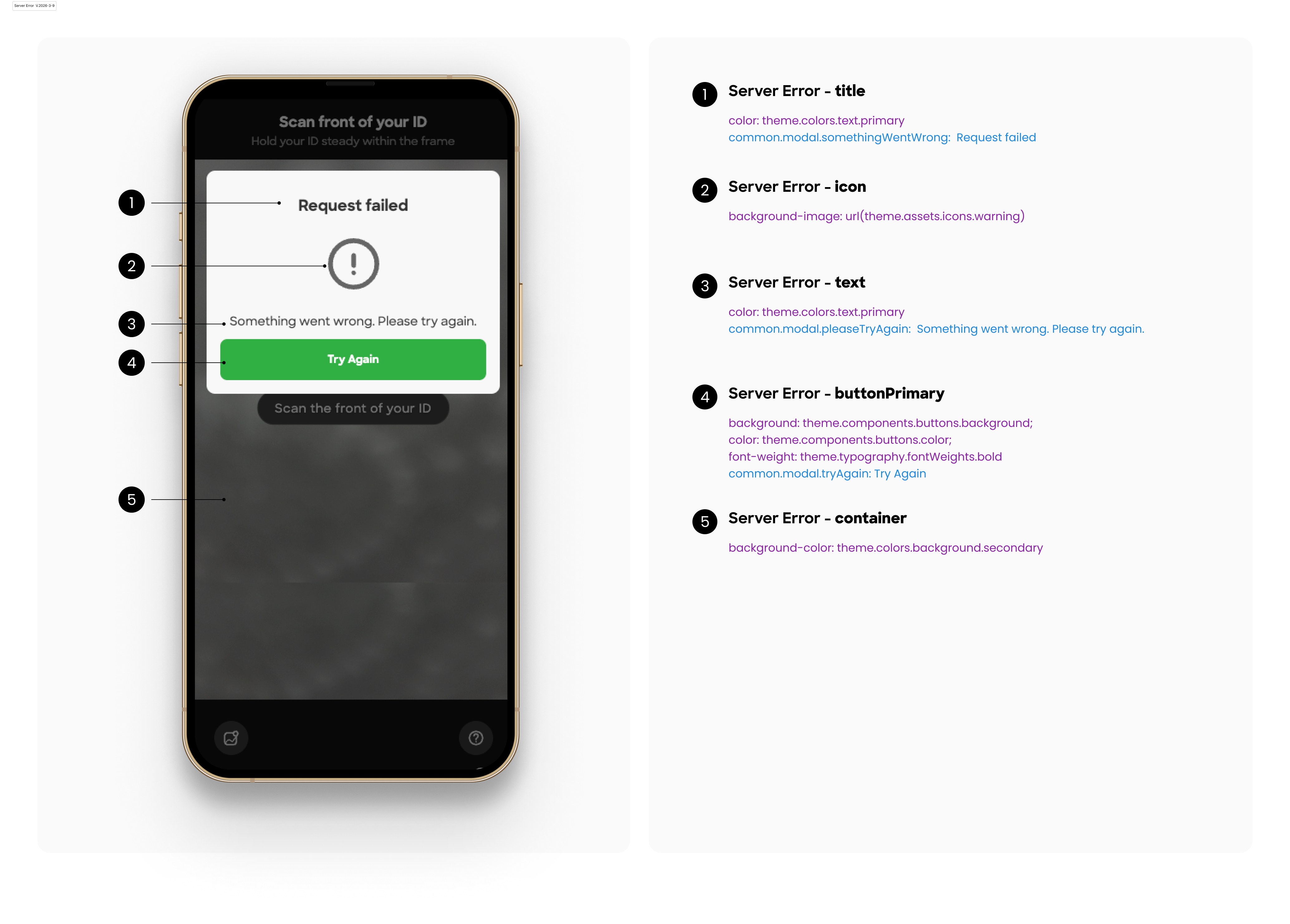
      "somethingWentWrong": "Request failed",
      "pleaseTryAgain": "Something went wrong. Please try again."
    },
    "sessionExpired": {
      "title": "Verification expired",
      "desc": "Contact the service provider to start a new verification"
    },
    "loading": {
      "weakNetwork": "Slow network, please wait"
    }
  },
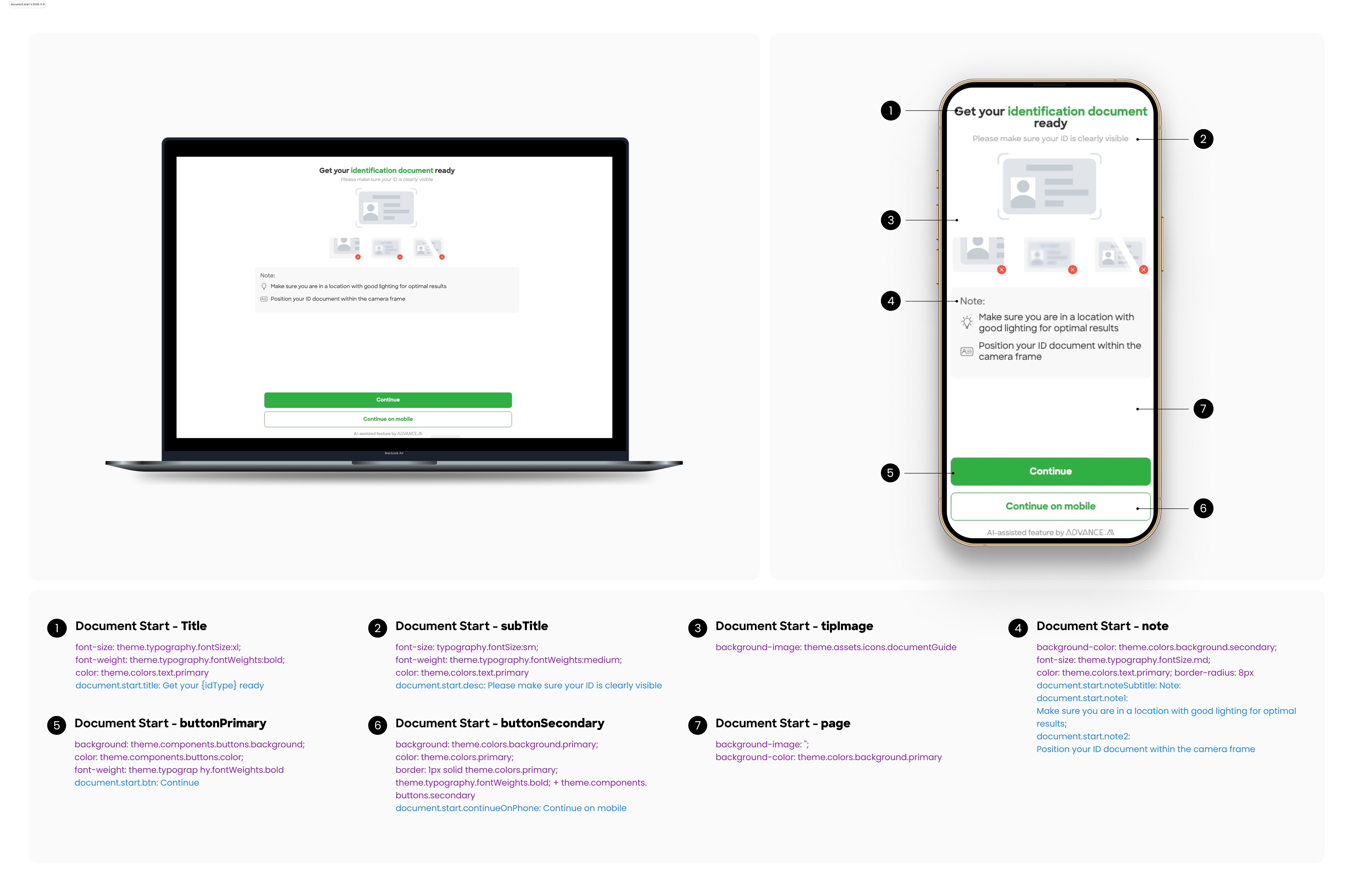
  "document": {
    "start": {
      "title": "Get your {idType} ready",
      "btn": "Continue",
      "continueOnPhone": "Continue on mobile",
      "desc": "Please make sure your ID is clearly visible",
      "noteSubtitle": "Note:",
      "note1": "Make sure you are in a location with good lighting for optimal results",
      "note2": "Position your ID document within the camera frame",
      "toast": "Please consent to {AGREEMENT_MAIN} and Advance Intelligence processing my personal data, including sensitive information such as biometric information, in accordance with the {AGREEMENT_MAIN} and Advance Intelligence Privacy Policy.",
      "agreementDesc": "I consent to {AGREEMENT_MAIN} and Advance Intelligence Group entities processing my personal data including sensitive information such as biometric information in accordance with {CUSTOMER} and {AAI} Privacy Policies. I confirm that I am {AGE} or older."
    },
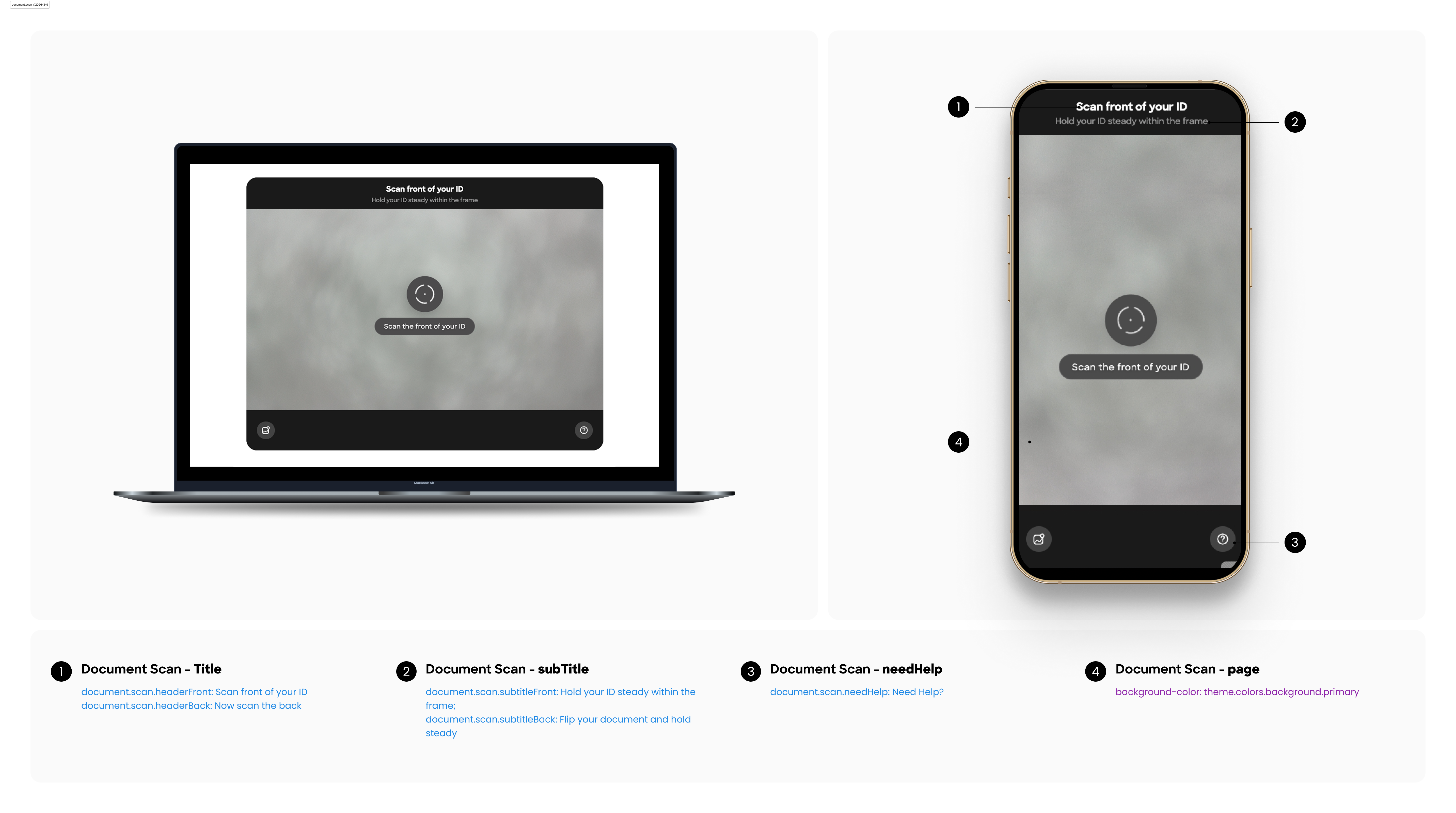
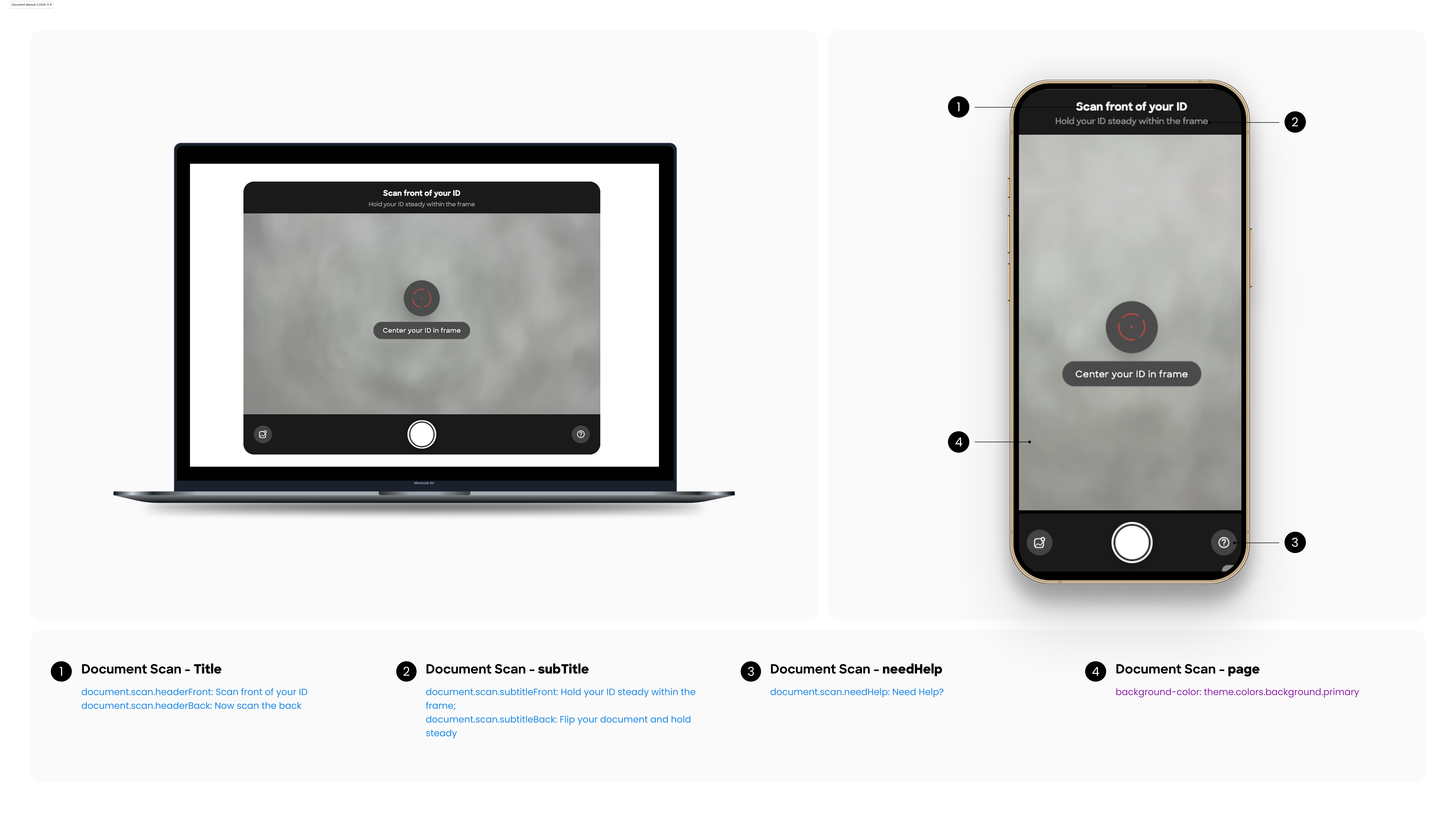
    "scan": {
      "title": "Scan document",
      "needHelp": "Need Help?",
      "badFlashlight": "The flashlight cannot be turned on, please turn it on manually",
      "driverLicense": "Driver's License",
      "nationalId": "ID Card",
      "residencePermit": "Residence Permit",
      "passport": "Passport",
      "defaultType": "identification document",
      "header": "Scan Front Side",
      "backHeader": "Scan Back Side",
      "desc": "Please place the document within the frame with the edges aligned",
      "tipUseCorrectType": "Please use ‘{type}’ for verification!",
      "tipPoorQuality": "Too blurry",
      "tipNoCard": "Center your ID in frame",
      "tipPointedCamera": "Please get closer to the camera.",
      "tipEdgeCross": "Move back",
      "tipGoodCard": "Hold steady",
      "captureSuccess": "Capture complete",
      "tipDontMove": "Do not move your documents or phone.",
      "multipleCards": "Multiple documents detected, use a single one.",
      "tipObstructed": "Please make sure the contents of the document are not obstructed",
      "tipSmallCard": "Move closer",
      "tipCardTooGlossy": "Too much glare",
      "loading": "Loading",
      "uploading": "Uploading",
      "timeout": "Timeout, please try again",
      "frontTip": "Scan the front of your ID",
      "backTip": "Scan the back of your ID",
      "retry": "Retry",
      "collected": "Document collected successfully",
      "flipToBack": "Please flip the document to the back side",
      "continueToAnotherDeviceDesc": "To ensure the accuracy of the verification results, please click the button below to copy the link or scan the QR code directly to jump to other devices to continue the verification.",
      "continueToAnotherDeviceBtn": "Use mobile phone verification",
      "galleryUploadBtn": "Upload Document",
      "frontSide": "Front Side",
      "backSide": "Back Side",
      "headerFront": "Scan front of your ID",
      "headerBack": "Now scan the back",
      "subtitleFront": "Hold your ID steady within the frame",
      "subtitleBack": "Flip your document and hold steady",
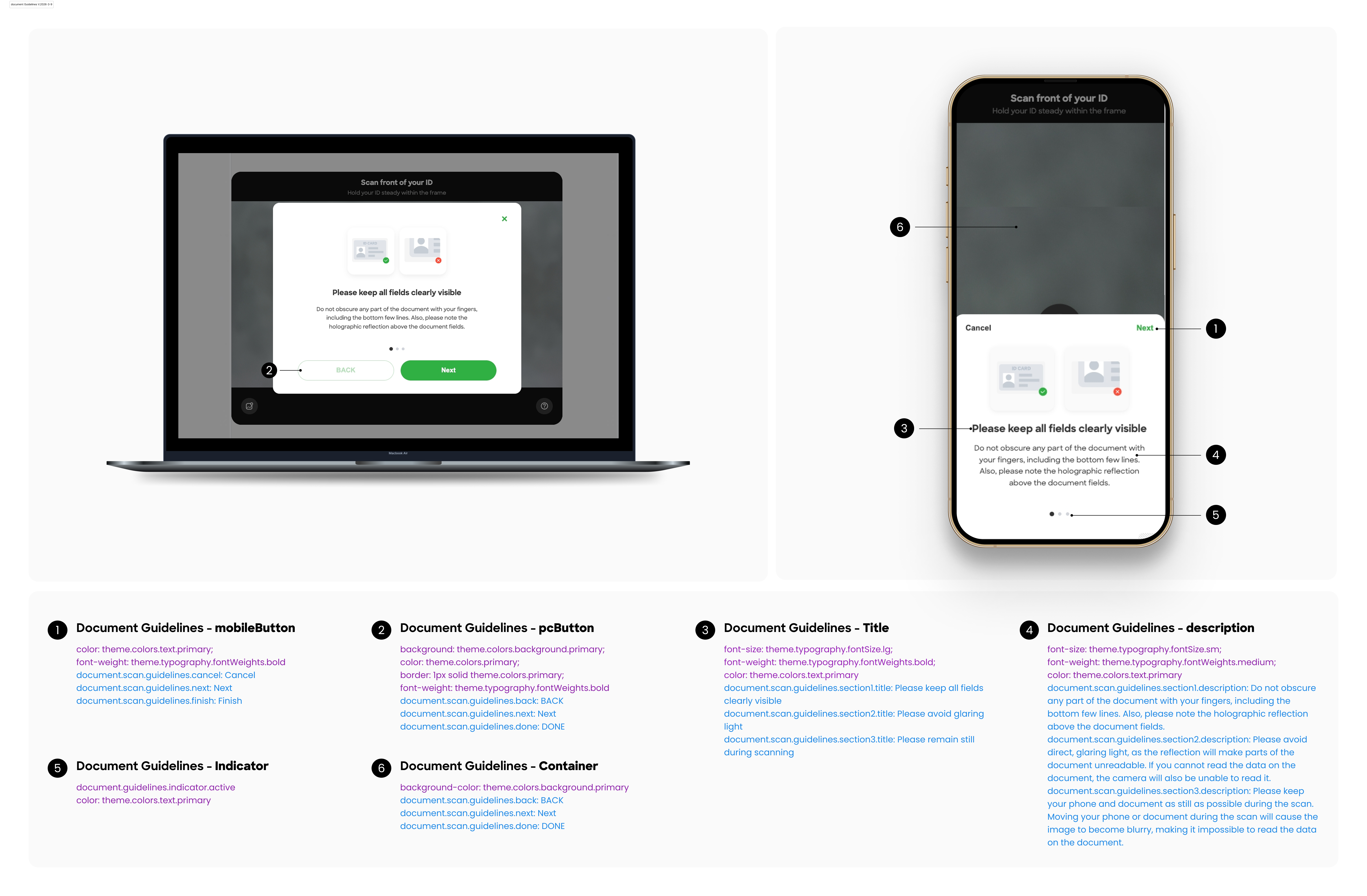
      "guidelines": {
        "title": "view our guidelines",
        "subtitle": "These guidelines describe tips regarding identification documents to help you achieve better results.",
        "cancel": "Cancel",
        "next": "Next",
        "finish": "Finish",
        "back": "BACK",
        "done": "DONE",
        "section1": {
          "title": "Please keep all fields clearly visible",
          "description": "Do not obscure any part of the document with your fingers, including the bottom few lines. Also, please note the holographic reflection above the document fields."
        },
        "section2": {
          "title": "Please avoid glaring light",
          "description": "Please avoid direct, glaring light, as the reflection will make parts of the document unreadable. If you cannot read the data on the document, the camera will also be unable to read it."
        },
        "section3": {
          "title": "Please remain still during scanning",
          "description": "Please keep your phone and document as still as possible during the scan. Moving your phone or document during the scan will cause the image to become blurry, making it impossible to read the data on the document."
        }
      }
    },
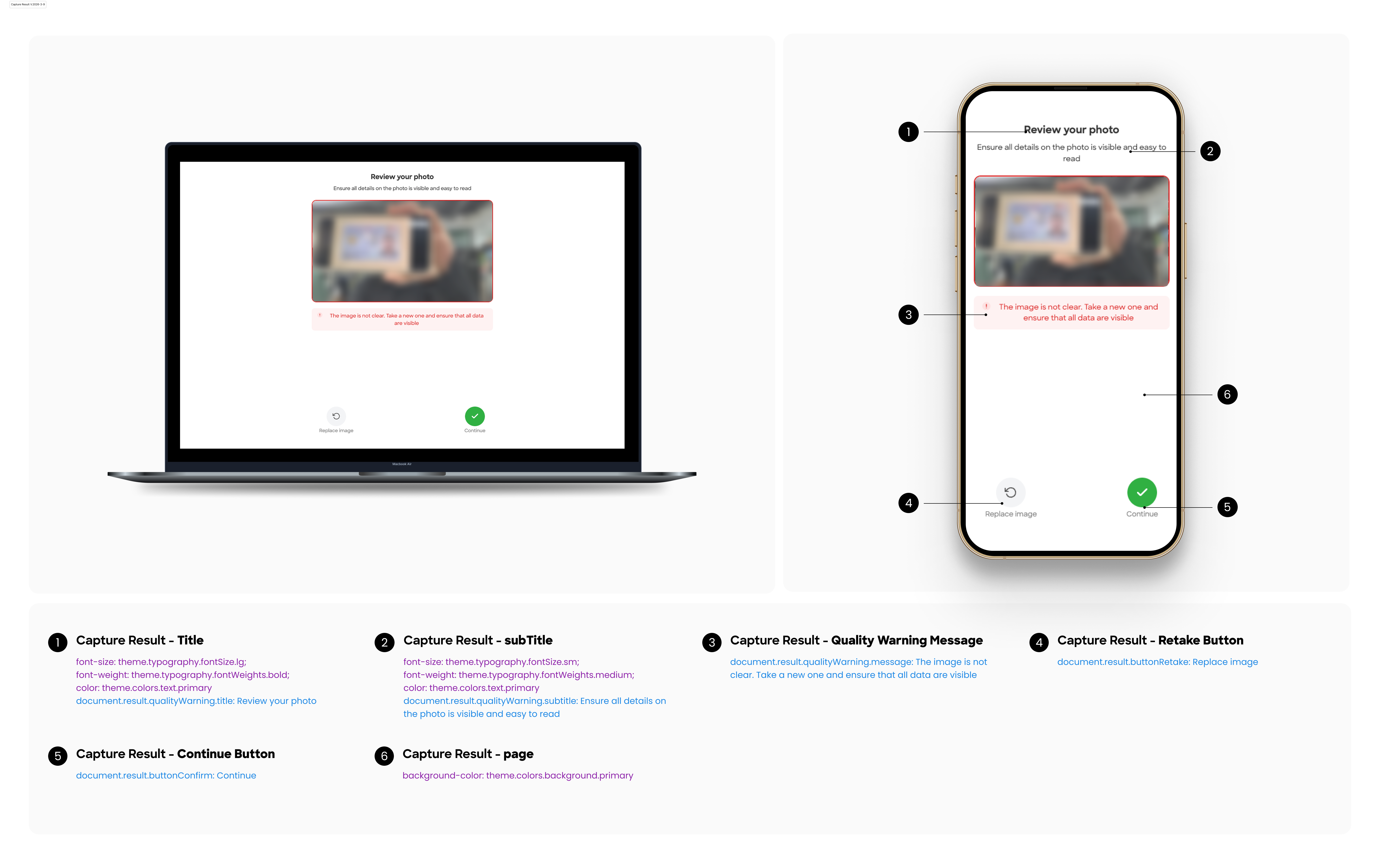
    "result": {
      "tip": "Please ensure that all data on your document is visible and readable ",
      "buttonRetake": "Replace image",
      "buttonConfirm": "Continue",
      "qualityWarning": {
        "title": "Review your photo ",
        "subtitle": "Ensure all details on the photo is visible and easy to read ",
        "issue": "Issue ",
        "message": "The image is not clear. Take a new one and ensure that all data are visible"
      }
    },
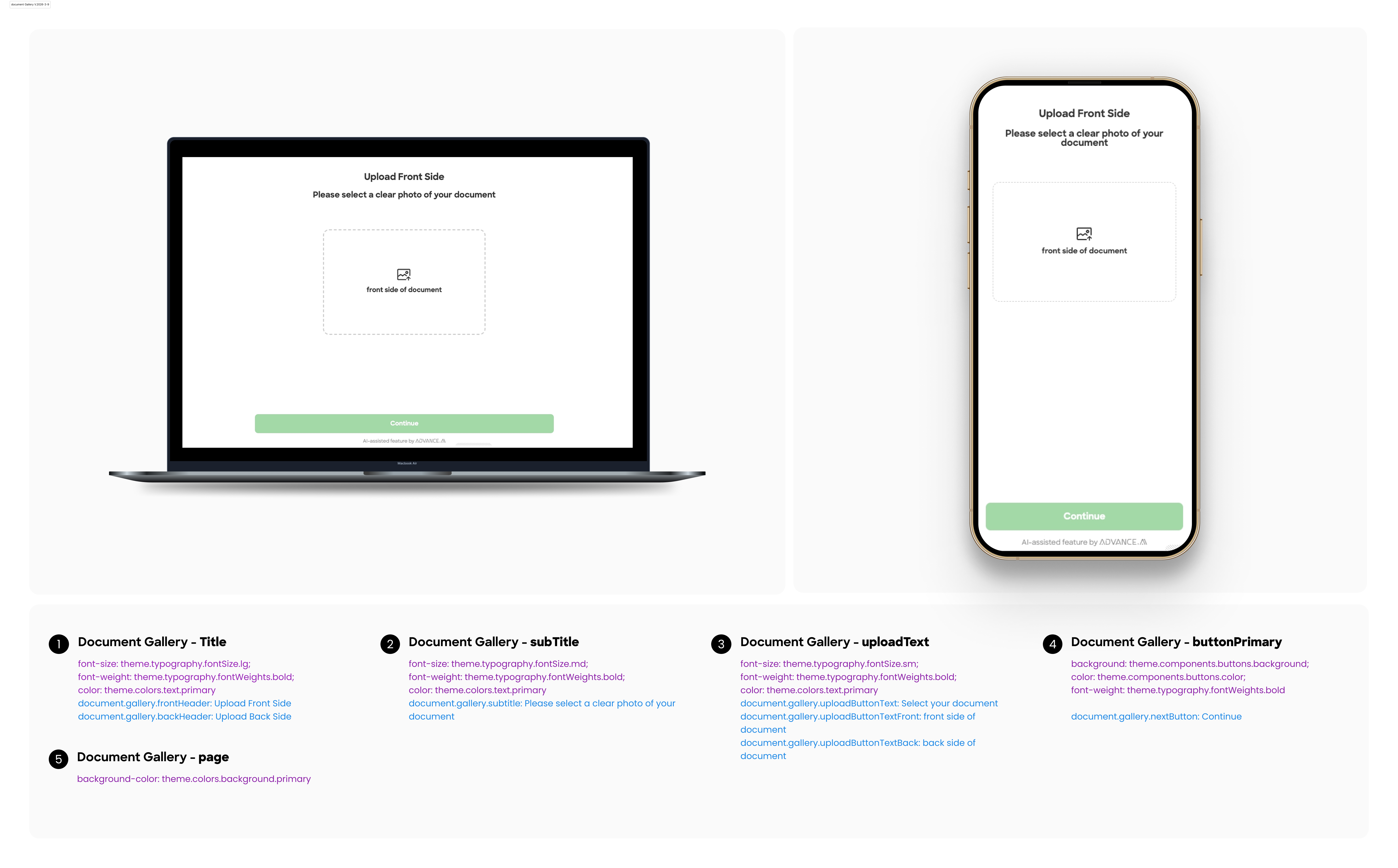
    "gallery": {
      "frontHeader": "Upload Front Side",
      "backHeader": "Upload Back Side",
      "subtitle": "Please select a clear photo of your document",
      "uploadButtonText": "Select your document",
      "uploadButtonTextFront": "front side of document",
      "uploadButtonTextBack": "back side of document",
      "nextButton": "Continue",
      "uploading": "Uploading...",
      "invalidFileType": "Please select a valid image file (JPG, PNG)",
      "fileTooLarge": "File size should not exceed 15MB",
      "fileTooSmall": "File size should be at least 50KB",
      "imageTooSmall": "Please select an image with dimensions between 512x512 and 4096x4096 pixels",
      "imageCompressionFailed": "Image is too large and cannot be compressed to the required size. Please select a smaller image",
      "imageProcessingFailed": "Image processing failed. Please try again",
      "uploadFailed": "Upload failed, please try again",
      "frontUploadSuccess": "Front side uploaded successfully! Now please upload the back side."
    }
  },
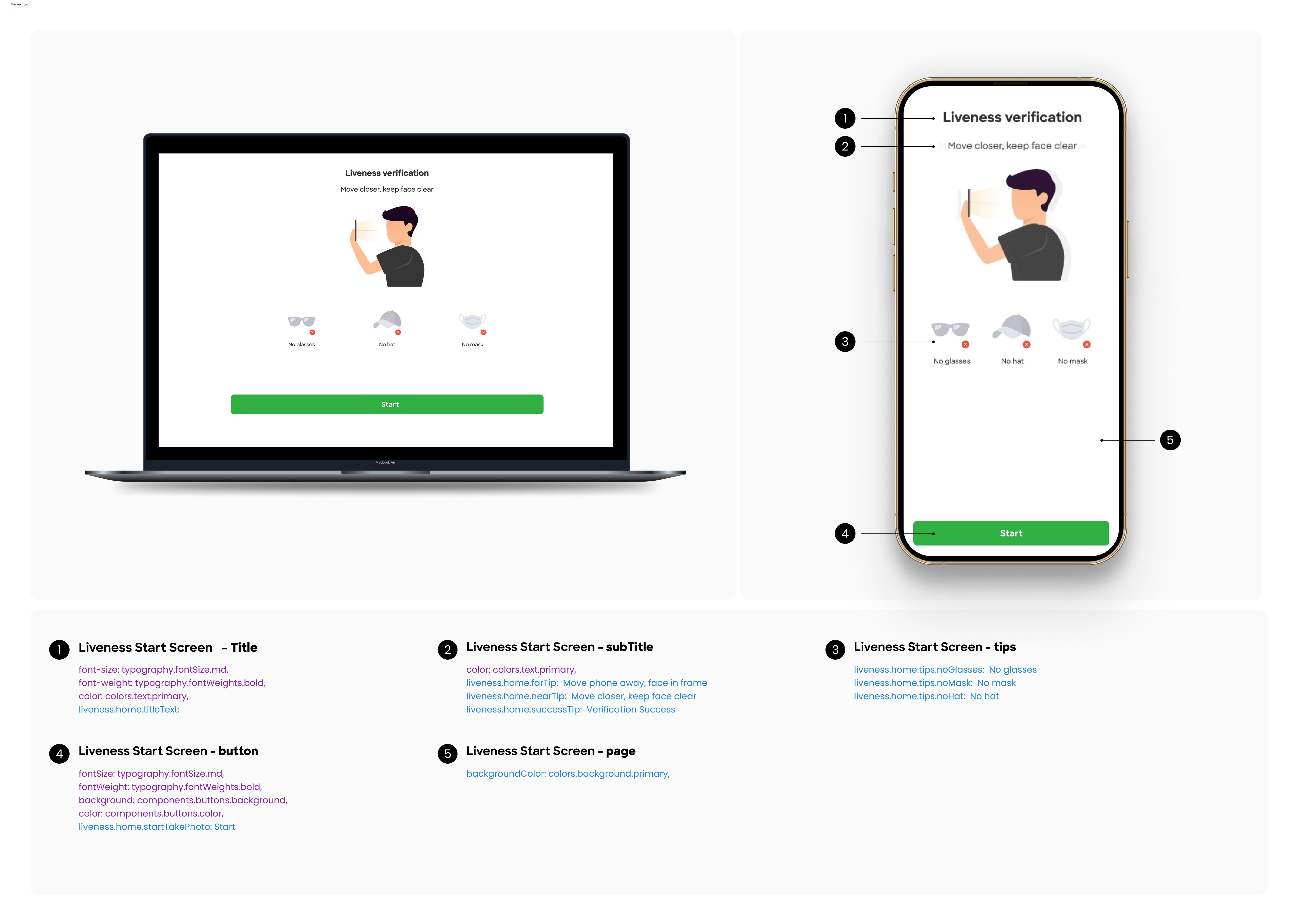
  "liveness": {
    "home": {
      "startTakePhoto": "Continue",
      "continueOnPhone": "Continue on phone",
      "loadingText": "Loading",
      "toast": "Please consent to {AGREEMENT_MAIN} and Advance Intelligence processing my personal data, including sensitive information such as biometric information, in accordance with the PIPO and Advance Intelligence Privacy Policy.",
      "agreementDesc": "I consent to {AGREEMENT_MAIN} and Advance Intelligence Group entities processing my personal data including sensitive information such as biometric information in accordance with {CUSTOMER} and {AAI} Privacy Policies. I confirm that I am {AGE} or older.",
      "confirm": "OK",
      "cancel": "Cancel",
      "retake": "Retake",
      "usePhoto": "Use Photo",
      "titleText": "Liveness verification",
      "titleDescText": "In the following process, please follow the on-screen instructions to move your face for verification.",
      "farTip": "Move phone away, face in frame",
      "nearTip": "Move closer, keep face clear",
      "successTip": "Verification Success",
      "focusLost": "Switch context",
      "tips": {
        "noGlasses": "No glasses",
        "noMask": "No mask",
        "noHat": "No hat"
      },
      "loading": "loading..."
    },
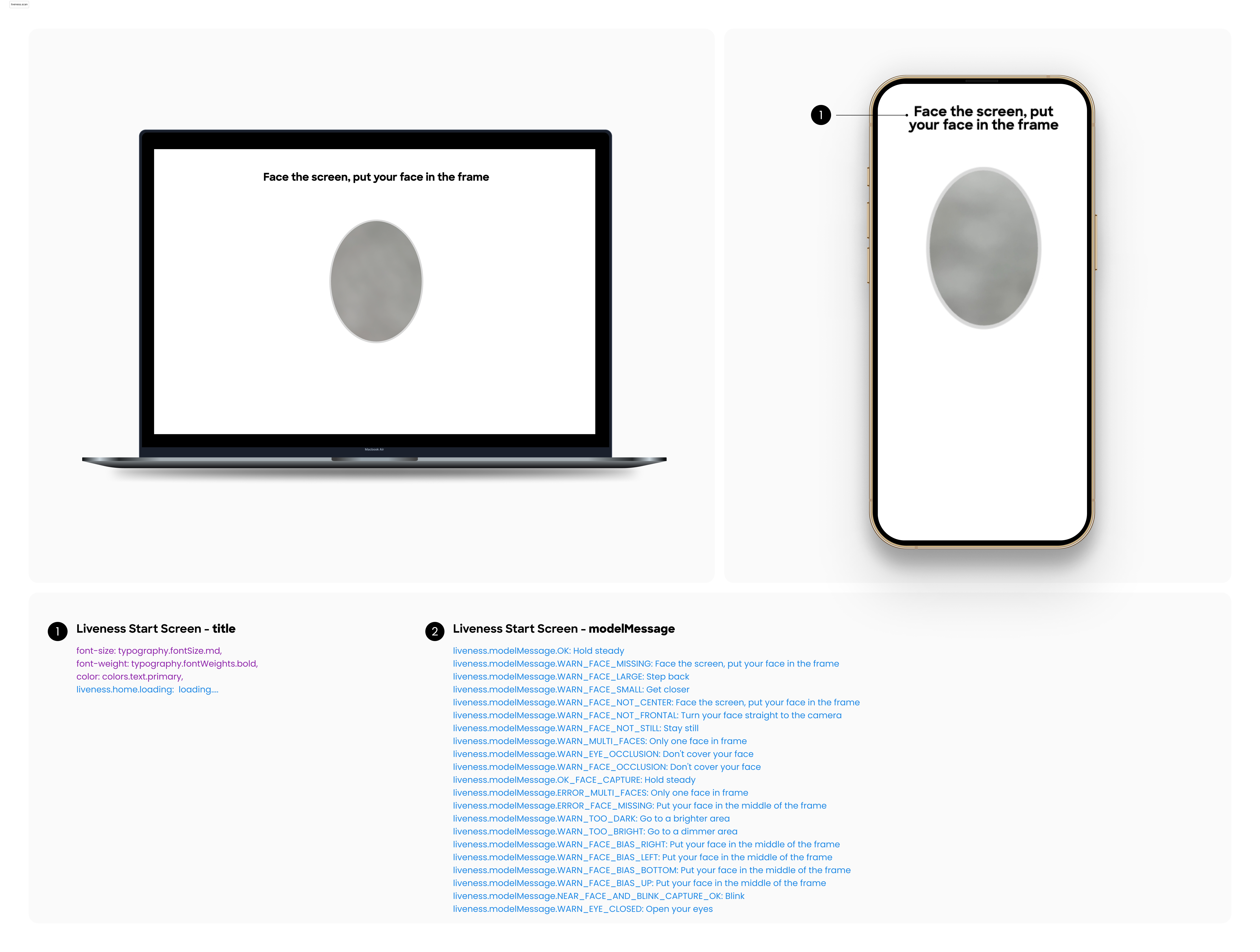
    "modelMessage": {
      "OK": "Hold steady",
      "WARN_FACE_MISSING": "Face the screen, put your face in the frame",
      "WARN_FACE_LARGE": "Step back",
      "WARN_FACE_SMALL": "Get closer",
      "WARN_FACE_NOT_CENTER": "Face the screen, put your face in the frame",
      "WARN_FACE_NOT_FRONTAL": "Turn your face straight to the camera",
      "WARN_FACE_NOT_STILL": "Stay still",
      "WARN_MULTI_FACES": "Only one face in frame",
      "WARN_EYE_OCCLUSION": "Don't cover your face",
      "WARN_FACE_OCCLUSION": "Don't cover your face",
      "OK_FACE_CAPTURE": "Hold steady",
      "ERROR_MULTI_FACES": "Only one face in frame",
      "ERROR_FACE_MISSING": "Put your face in the middle of the frame",
      "WARN_TOO_DARK": "Go to a brighter area",
      "WARN_TOO_BRIGHT": "Go to a dimmer area",
      "WARN_FACE_BIAS_RIGHT": "Put your face in the middle of the frame",
      "WARN_FACE_BIAS_LEFT": "Put your face in the middle of the frame",
      "WARN_FACE_BIAS_BOTTOM": "Put your face in the middle of the frame",
      "WARN_FACE_BIAS_UP": "Put your face in the middle of the frame",
      "WARN_EYE_CLOSED": "Open your eyes",
      "MOTION_DETECTION_EYE_BLINK": "Blink",
      "MOTION_DETECTION_POS_YAW": "Turn head",
      "MOTION_DETECTION_MOUTH_OPEN": "Open mouth",
      "WARN_MOTION": "Stay still",
      "WARN_LARGE_YAW": "Turn your head slowly",
      "WARN_MOUTH_OCCLUSION_IN_MOTION": "Don't cover your mouth",
      "ERROR_MUCHMOTION": "Move too much, stay still",
      "WARN_LOW_CONTRAST": "Go to a brighter area",
      "WARN_NOT_CONTINEOUS": "Please follow the instructions",
      "ERROR_FACE_OCCLUSION": "Don't cover your face"
    }
  },
  "document_database": {
    "nondoc": {
      "title": "Provide your data",
      "subtitle": "Fill out the required fields to pass the Verification",
      "inputPlaceholder": "Please input BVN code",
      "invalidFormat": "Invalid format. Please enter a valid number.",
      "validationRuleNotFound": "Validation rule not found",
      "bvn_inputPlaceholder": "Please input BVN code",
      "bvn_invalidFormat": "Invalid format. Please enter a valid number.",
      "nin_inputPlaceholder": "Please input NIN code",
      "nin_invalidFormat": "Please enter 11-digit number,eg:12345678911.",
      "submitting": "Submitting...",
      "continue": "Continue",
      "idn_nik_label": "ID Number (NIK)",
      "idn_nik_placeholder": "Enter your 16-digit ID number",
      "idn_nik_required": "ID number is required",
      "idn_nik_invalid": "Invalid ID number format. Please enter 16 digits",
      "idn_fullname_label": "Full Name",
      "idn_fullname_placeholder": "Enter your full name",
      "idn_fullName_required": "Full name is required",
      "idn_fullname_invalid": "Full name cannot exceed 200 characters"
    }
  }
}
Configuration Example
For example, if you want to modify the title, button text, and description on the start page of the document, you can use the following JSON configuration.
{
    "document": {
        "start": {
            "title": "Get your {idType} ready",
            "btn": "Next",
            "desc": "Please make sure your ID is clearly visible",
        }
    }
}
3. Feature Configuration
Field Description
| Module | Field Name | Type | Default | Description |
|---|---|---|---|---|
| Global | enableFallback | boolean | TRUE | Allow redirect to fallback page? |
| Document (ID Recognition) | scanTimeout | number | 9 | Document scan timeout (in seconds) |
| Document | showStartPage | boolean | TRUE | Whether to show the start guide page before ID recognition |
| Document | uploadMode | enum | realtime_capture | Determines the image upload method (realtime_capture for direct camera access, gallery for only selecting from device storage). Enum: realtime_capture,gallery |
| Document | galleryIntegration | enum | disabled | Configures access behavior during real-time capture (always show gallery entry, fallback show only on fallback page, disabled hide gallery entry). Enum: always,fallback,disabled |
| Liveness Detection | scanTimeout | number | 30 | galleryLiveness detection timeout (in seconds) |
| Liveness Detection | showStartPage | boolean | TRUE | Whether to show the start guide page before liveness detection |
Configuration Example
{
  "enableFallback": false,
  "document": {
    "scanTimeout": 15,
    "galleryUpload": {
      "uploadMode": "realtime_capture",
      "realtimeOptions": {
        "galleryIntegration": "disabled"
      },
    },
  },
  "liveness": {
    "showStartPage": false
  }
}
4. Visual Configuration Guide
Below is a sample configuration for the detail page.You can follow the visual guide in the image to complete the detailed configuration
Document Start Screen
Document Scan Screen
Document Manual Scan Screen
Document Capture Result
Document Guidelines Screen
Document Gallery Screen
Liveness Start Screen
Liveness Scan Screen
No Permission Screen
Fallback Screen
Submission Screen
Modal Screen
Document Recognition Modal
Liveness Recognition Modal
Common Modal
Updated 7 months ago